> ## Documentation Index
> Fetch the complete documentation index at: https://gcore-doc-1256a.mintlify.site/llms.txt
> Use this file to discover all available pages before exploring further.

# Connect dedicated servers into a VLAN

VLAN - virtual local network that allows working in an internal network regardless of physical server locations.

In order to set up VLAN between your servers, you should use DCI Manager.

## VLAN initiation

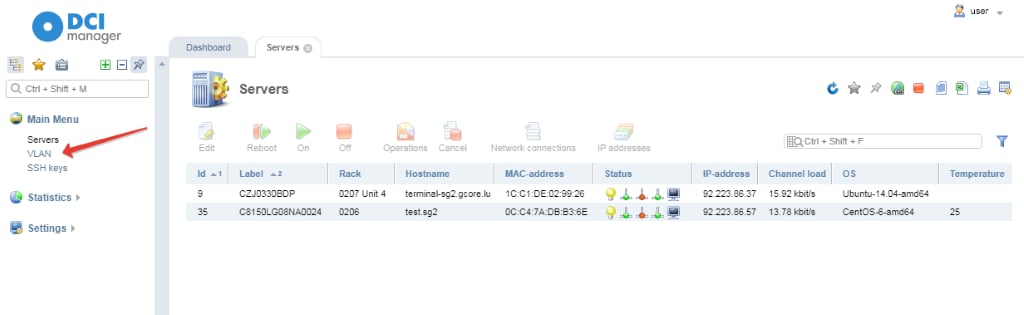
1\. Go to DCI manager and choose VLAN section.
<Frame>
  <img src="https://mintcdn.com/gcore-doc-1256a/MzOBwOtlVgGn49AQ/images/docs/hosting/dedicated-servers/manage/networking/connect-dedicated-servers-into-a-vlan/blobid0.png?fit=max&auto=format&n=MzOBwOtlVgGn49AQ&q=85&s=add7a8993752af7065fbb62bd0f9ccf5" alt="VLAN section." width="1024" height="315" data-path="images/docs/hosting/dedicated-servers/manage/networking/connect-dedicated-servers-into-a-vlan/blobid0.png" />
</Frame>

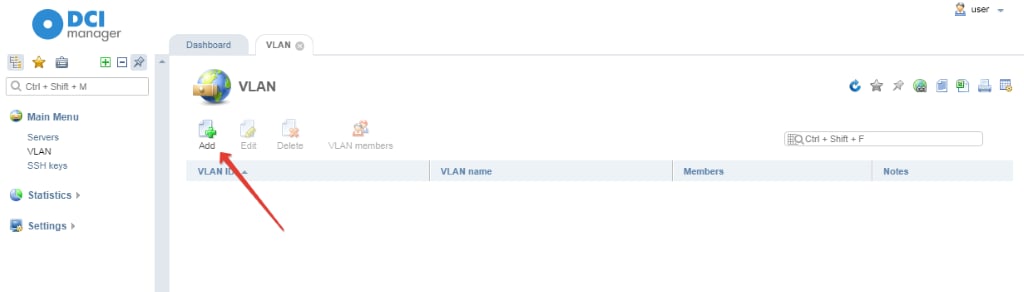
2\. Click **Add** button to create a new VLAN.
<Frame>
  <img src="https://mintcdn.com/gcore-doc-1256a/MzOBwOtlVgGn49AQ/images/docs/hosting/dedicated-servers/manage/networking/connect-dedicated-servers-into-a-vlan/blobid1.png?fit=max&auto=format&n=MzOBwOtlVgGn49AQ&q=85&s=f4974f9422882e453eeaca7b0ed0cdf3" alt="new VLAN" width="1024" height="292" data-path="images/docs/hosting/dedicated-servers/manage/networking/connect-dedicated-servers-into-a-vlan/blobid1.png" />
</Frame>

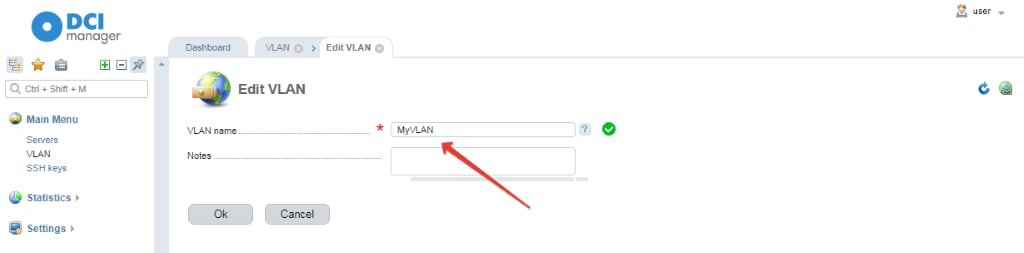
3\. Type a name for VLAN. For example, MyVLAN. Click ОК.
<Frame>
  <img src="https://mintcdn.com/gcore-doc-1256a/MzOBwOtlVgGn49AQ/images/docs/hosting/dedicated-servers/manage/networking/connect-dedicated-servers-into-a-vlan/blobid5.png?fit=max&auto=format&n=MzOBwOtlVgGn49AQ&q=85&s=91ac7c9457c78912344836c069f863a9" alt="Type a name for VLAN" width="1024" height="253" data-path="images/docs/hosting/dedicated-servers/manage/networking/connect-dedicated-servers-into-a-vlan/blobid5.png" />
</Frame>

## Adding new members

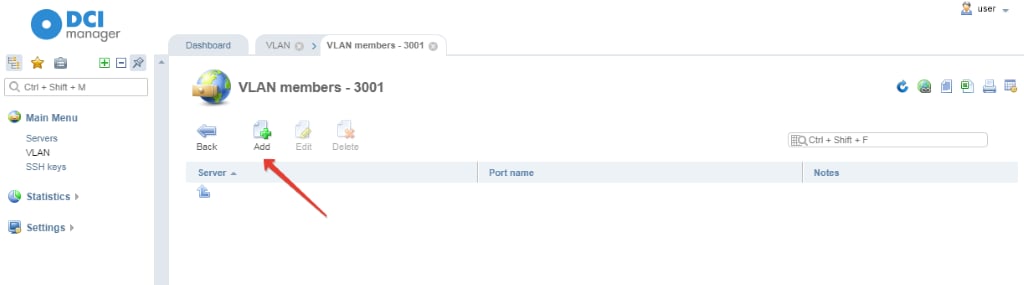
You should add members to realize an interaction by virtual local network. VLAN can be set up only for servers that belong to one account.

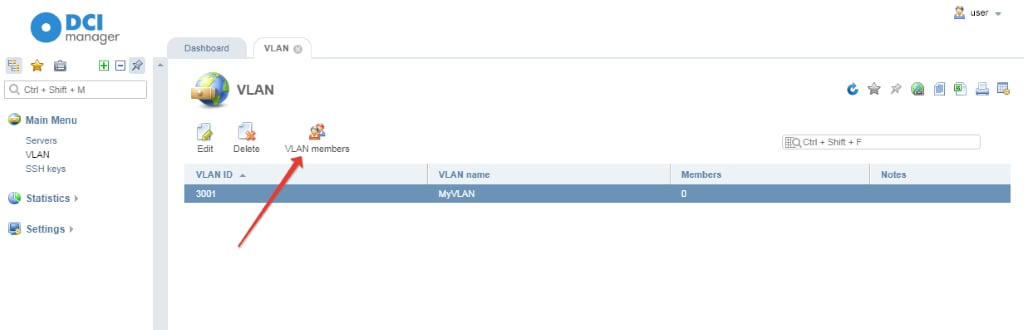
1\. Highlight a created VLAN and go to VLAN Members section.
<Frame>
  <img src="https://mintcdn.com/gcore-doc-1256a/MzOBwOtlVgGn49AQ/images/docs/hosting/dedicated-servers/manage/networking/connect-dedicated-servers-into-a-vlan/blobid6.png?fit=max&auto=format&n=MzOBwOtlVgGn49AQ&q=85&s=c1cff73746fbc6911a3381f371e7a757" alt="VLAN Members section." width="1024" height="330" data-path="images/docs/hosting/dedicated-servers/manage/networking/connect-dedicated-servers-into-a-vlan/blobid6.png" />
</Frame>

2\. Click **Add**.

<Frame>
  <img src="https://mintcdn.com/gcore-doc-1256a/MzOBwOtlVgGn49AQ/images/docs/hosting/dedicated-servers/manage/networking/connect-dedicated-servers-into-a-vlan/blobid7.png?fit=max&auto=format&n=MzOBwOtlVgGn49AQ&q=85&s=7a5539519b7e8489cce07f24498ffe8c" alt="Add" width="1024" height="285" data-path="images/docs/hosting/dedicated-servers/manage/networking/connect-dedicated-servers-into-a-vlan/blobid7.png" />
</Frame>

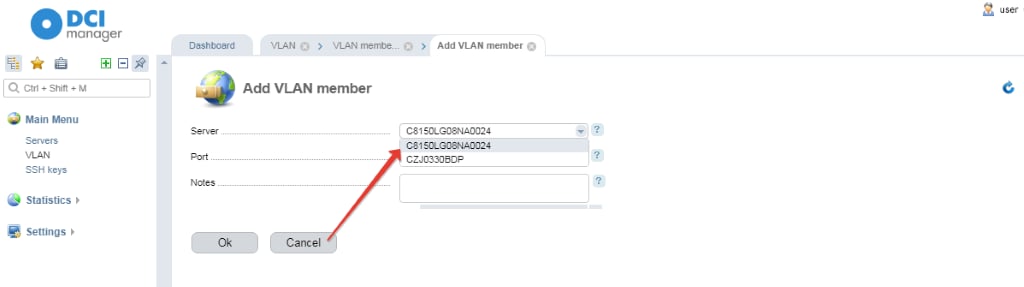
3\. Choose a server you need to add in a drop-down list.
<Frame>
  <img src="https://mintcdn.com/gcore-doc-1256a/MzOBwOtlVgGn49AQ/images/docs/hosting/dedicated-servers/manage/networking/connect-dedicated-servers-into-a-vlan/blobid8.png?fit=max&auto=format&n=MzOBwOtlVgGn49AQ&q=85&s=382b5730d5dab7ce3bd3dddcaa6cedcd" alt="Choose a server you need to add in a drop-down list." width="1024" height="287" data-path="images/docs/hosting/dedicated-servers/manage/networking/connect-dedicated-servers-into-a-vlan/blobid8.png" />
</Frame>

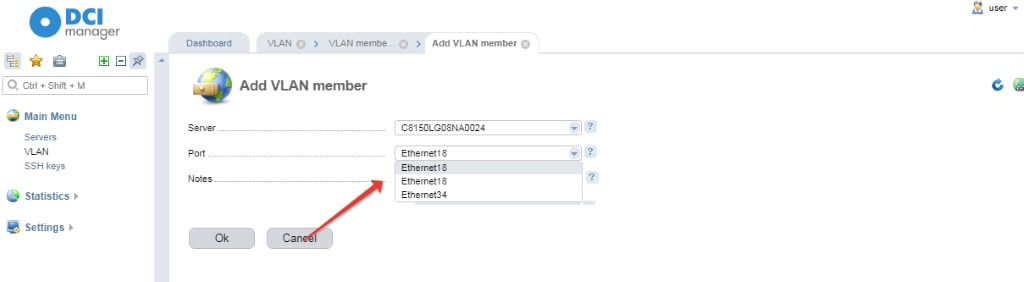
4\. In a Port section choose an interface of the server and click **OK**.
<Frame>
  <img src="https://mintcdn.com/gcore-doc-1256a/MzOBwOtlVgGn49AQ/images/docs/hosting/dedicated-servers/manage/networking/connect-dedicated-servers-into-a-vlan/blobid9.png?fit=max&auto=format&n=MzOBwOtlVgGn49AQ&q=85&s=cd81fa4347d0ea7ba409c609a1e537c3" alt=" Port section" width="1024" height="282" data-path="images/docs/hosting/dedicated-servers/manage/networking/connect-dedicated-servers-into-a-vlan/blobid9.png" />
</Frame>

After that VLAN is ready to use. A number of servers that can be added to VLAN is unlimited.